lipstick: Style definitions for nice terminal layouts
A port of charmbracelet's lipgloss (v2): colours, borders, padding, alignment, tables, lists, trees and layered compositions for command-line output. Styles are composable modifiers; they render to blocks of styled text, laid out in the width available and turned into ANSI escape sequences only when printed. lipstick-brick shows the blocks in brick and vty applications.
[Skip to Readme]

Modules
[Index] [Quick Jump]
Flags
Manual Flags
| Name | Description | Default |
|---|---|---|
| examples | Build the example programs | Disabled |
Use -f <flag> to enable a flag, or -f -<flag> to disable that flag. More info
Downloads
- lipstick-0.1.0.0.tar.gz [browse] (Cabal source package)
- Package description (as included in the package)
Maintainer's Corner
For package maintainers and hackage trustees
Candidates
- No Candidates
| Versions [RSS] | 0.1.0.0 |
|---|---|
| Change log | CHANGELOG.md |
| Dependencies | ansi-terminal (>=1.1 && <1.2), array (>=0.5 && <0.6), base (>=4.20 && <4.23), bytestring (>=0.11 && <0.13), colour (>=2.3 && <2.4), containers (>=0.6 && <0.9), filepath (>=1.5 && <1.6), lipstick, terminal-size (>=0.3.4 && <0.4), text (>=2.1.2 && <2.2) [details] |
| Tested with | ghc ==9.10.3 || ==9.12.2 || ==9.14.1 |
| License | MIT AND Unicode-3.0[multiple license files] |
| Author | Andrea Bedini |
| Maintainer | andrea@bedini.au |
| Uploaded | by andreabedini at 2026-11-09T09:45:29Z |
| Category | Console, Text |
| Home page | https://github.com/andreabedini/lipstick |
| Bug tracker | https://github.com/andreabedini/lipstick/issues |
| Source repo | head: git clone https://github.com/andreabedini/lipstick.git |
| Distributions | |
| Reverse Dependencies | 1 direct, 0 indirect [details] |
| Executables | lipstick-screenshots, lipstick-demo |
| Downloads | 0 total (0 in the last 30 days) |
| Rating | (no votes yet) [estimated by Bayesian average] |
| Your Rating | |
| Status | Docs uploaded by user Build status unknown [no reports yet] |
Readme for lipstick-0.1.0.0
[back to package description]lipstick
Style definitions for nice terminal layouts, in Haskell. lipstick is a port of lipgloss (v2) for command-line programs: colours, borders, padding, alignment, tables, lists, trees and layered compositions, rendered to text with ANSI escape sequences.
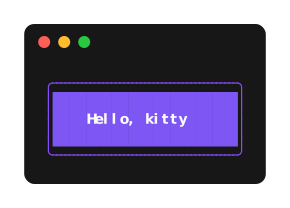
{-# LANGUAGE OverloadedStrings #-}
import Lipstick

card :: Mod Style
card =
  bold
    <> fg "#FAFAFA"
    <> bg "#7D56F4"
    <> padding 1 4
    <> width 24
    <> border roundedBorder
    <> borderFg "#874BFD"

main :: IO ()
main = putBlock (render card "Hello, kitty")
lipstick is on Hackage and builds with GHC 9.10, 9.12 and 9.14. Add it to
the build-depends of your package:
build-depends: lipstick ^>=0.1
For brick and vty applications, add
lipstick-brick too.
The examples import Lipstick whole and use OverloadedStrings; the table
example also uses LambdaCase (part of GHC2024), the layers example
import Data.Text qualified as T, and the output example
import System.IO (stdout). Some of lipstick's names (bold, fg,
border, center, text, render, width, the colour names) are also
exported by brick, vty, colour or prettyprinter; programs that use those
too can import Lipstick qualified as L.
Styles are modifiers
A Mod Style is a modifier, in the same sense as optparse-applicative's
Mod: modifiers form a monoid and later settings win, so styles are built
and extended with <>.
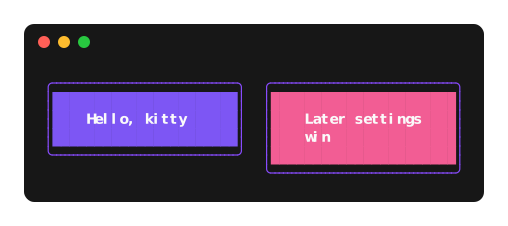
warning :: Mod Style
warning = card <> bg "#F25D94"
Text attributes (fg, bg, bold, underline, link, …) apply to
every kind of thing lipstick draws, not just styles, so the same modifier
works everywhere:
base :: Mod f
base = fg red <> bold

render base "text"            -- a styled box
table base headers rows       -- the base style of a table
list base items               -- the base style of a list
Other modifiers apply to the things that have the corresponding part:
padding and margin to styles, border to styles and tables, width to
styles, tables, lists, trees and placed blocks, align to styles and placed
blocks, and the maxWidth / maxHeight crop to everything but styled
text. A modifier on something that does not support it is a type error.
The sizes mean the same for everything that has them. With width n, a
thing is n columns wide when there is room, and with less it shrinks like
any other. height n is the least number of lines. For a style, width
and height include padding and border but not margins, as in lipgloss.
maxWidth and maxHeight crop the whole result, a style's margins
included, to at most that many columns or lines; with maxHeight, a table
leaves out body rows instead. With a width, text is word-wrapped to fit, or
cut with an ellipsis with noWrap.
Blocks and layout
render returns a Block: a rectangle of styled text, which gets its width
only when it is laid out.
joinHorizontal center
  [ render card "Hello, kitty"
  , render (warning <> marginLeft 2) "Later settings win"
  ]
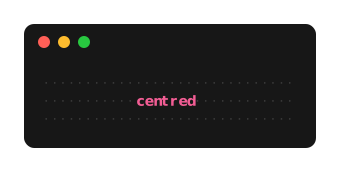
place
  (width 30 <> height 3 <> align center <> valign center <> whitespaceChars "·" <> fg "#383838")
  (render (bold <> fg "#F25D94") "centred")
frame puts an existing block in a box: render style text is
frame style (fromInline text). A style's text settings (align,
noWrap, breakAfter, tabWidth, transform, inline) apply, like its
colours, to all the text inside what it frames, unless something nearer
sets them again. hcat / joinHorizontal put blocks side by side and
vcat / joinVertical stack them.
Text in a block wraps to the width the block is laid out in. fillWidth
(or grow n, for a weighted share) makes a block take the spare columns of
its row, and stretchHeight makes it as tall as the tallest block next to
it. The output functions lay blocks out in the RenderEnv's width (with
Nothing, at their natural width); layout does it explicitly.
Text
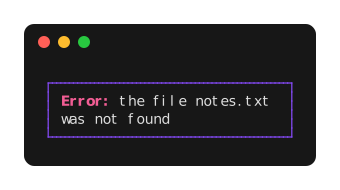
Text with several styles is Inline, built with styled and <>. Styles
nest: the attributes of the enclosing style show through wherever the inner
ones do not set them.
render
  (width 30 <> border normalBorder <> borderFg "#874BFD" <> padding 0 1)
  (styled (bold <> fg "#F25D94") "Error: " <> "the file " <> styled italic "notes.txt" <> " was not found")
Output from other programs that already contains escape sequences goes
through fromAnsi, which keeps colours, attributes and hyperlinks and drops
everything else:
render (border roundedBorder) (fromAnsi "\ESC[1;32mok\ESC[0m 3 tests passed")
Also: breakAfter (wrap after extra characters such as -),
styleRanges and styleIndices (highlight columns or characters of
existing text, e.g. fuzzy-search matches), transform, ansiWidth.
Widths follow the Unicode 16.0.0 grapheme cluster rules (the official conformance tests pass) and East Asian Width, so CJK text, emoji, flags and combining marks line up.
Tables
table
  ( borderFg "#874BFD"
      <> headerStyle (bold <> fg "#F25D94" <> align center)
      <> cellStyle (\case BodyCell r _ | odd r -> padding 0 1 <> faint; _ -> padding 0 1)
  )
  ["Language", "Formal", "Informal"]
  [ ["Chinese", "您好", "你好"]
  , ["Japanese", "こんにちは", "やあ"]
  , ["Russian", "Здравствуйте", "Привет"]
  ]
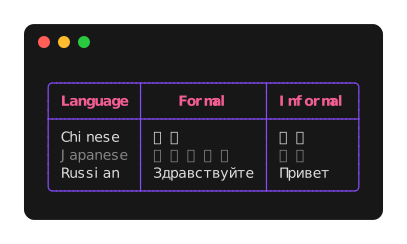
Cells are blocks, so they can hold lists, other tables or anything else.
A table fits the width it is laid out in: columns shrink, wrapping their
cells, widest first but without breaking a word while another column can
still wrap (headers are cut short instead), and with fillWidth they grow
to fill it. With a width, columns shrink or grow to fit that instead;
fitContent makes the width a maximum. With a maxHeight, the body rows
that do not fit are left out, with a row of … in their place where it
fits, yOffset scrolls, and visibleRows tells which rows are shown; a
height adds empty rows up to it. headerRule, columnRules, rowRules
and the border* modifiers choose which lines are drawn.
Lists and trees
Trees take a Data.Tree; items are blocks, so anything can go in them,
tables included.
tree
  (enumerator roundedTreeEnumerator <> enumeratorStyle (fg "#874BFD") <> rootStyle (fg "#F25D94"))
  (Node "." [Node "macOS" [], Node "Linux" [Node "NixOS" [], Node "Arch" []], Node "BSD" []])

nestedList
  (enumerator (byDepth (\depth -> if depth == 0 then roman else bullet)) <> enumeratorStyle (fg "#F25D94"))
  [Node "Glossier" [Node "Cloud Paint" [], Node "Boy Brow" []], Node "Nyx" []]
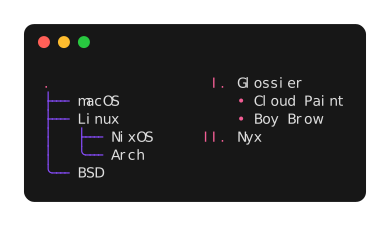
The enumerators are treeEnumerator, roundedTreeEnumerator, bullet,
dash, asterisk, arabic, alphabet and roman, or your own, made
with markers. Items, enumerators and indentation are styled separately,
by position if needed. Items wrap in the width left after their
indentation.
Layers
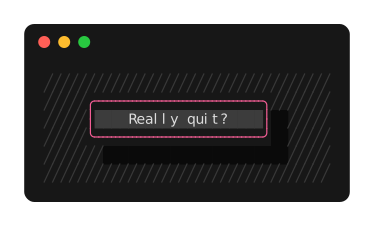
Blocks can be stacked at any position, for dialogs, overlays and the like.
layerAt finds the named layer under a point, for mouse handling.
compose
  [ layer (fg "#383838") (text (T.intercalate "\n" (replicate 6 (T.replicate 34 "╱"))))
  , layer (offset 7 2 <> zIndex 1) (render (bg "#0A0A0A" <> width 22 <> height 3) "")
  , layer
      (offset 5 1 <> zIndex 2 <> layerId "dialog")
      (render (border roundedBorder <> borderFg "#F25D94" <> bg "#3C3C3C" <> padding 0 2 <> width 22 <> align center) "Really quit?")
  ]
Colours
Colours are written as "#7D56F4", "#fa0", palette indices ("201",
"5") or names (red, brightBlue, …). Adaptive colours are resolved only
when printing:
lightDark light darkpicks by the terminal background;complete trueColor color256 color16picks by what the terminal supports.
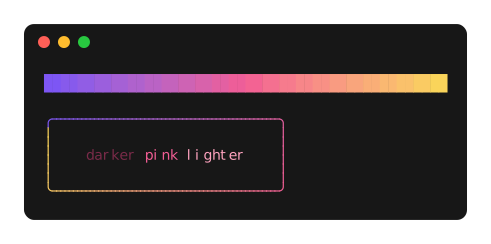
blend and blend2D make gradients, darken, lighten and complementary
adjust colours; they work in the OkLab colour space. borderFgBlend draws a
gradient around a border.
vcat
  [ hcat [render (bg c) "  " | c <- blend 24 ["#7D56F4", "#F25D94", "#FAD45A"]]
  , text ""
  , render
      (border roundedBorder <> borderFgBlend ["#7D56F4", "#F25D94", "#FAD45A"] <> padding 1 4)
      ( styled (fg (darken 0.4 "#F25D94")) "darker "
          <> styled (fg "#F25D94") "pink "
          <> styled (fg (lighten 0.4 "#F25D94")) "lighter"
      )
  ]
Output
putBlock and hPutBlock print a block, reducing colours to what the
output supports. Detection follows the usual conventions: no escape
sequences when the output is not a terminal (unless CLICOLOR_FORCE is
set to anything but 0), no colours with NO_COLOR, and the colour depth
from COLORTERM and TERM. On Windows the console's ANSI processing is
switched on as needed. Blocks are laid out in COLUMNS if it is set to a
positive number, even when the output is not a terminal, or else in the
terminal's width; output that is not going to a terminal otherwise keeps
its natural width.
The background is taken from COLORFGBG when the terminal sets it and is
assumed dark otherwise. To ask the terminal, which takes a round trip and
reads from stdin, detect once and keep the result:
main = do
  env <- detectEnvQuery stdout
  hPutBlockWith env stdout (render card "Hello")
toAnsi env block gives the text without printing it, and renderPlain
gives it without any escape sequences.
brick and vty
lipstick-brick
shows blocks in brick and vty applications. It uses only the public API:
Lipstick.Grid gives the laid-out lines, cells and styled spans of a
block, so blocks can be shown in other outputs too.
How lipstick differs from lipgloss
lipgloss renders to strings with escape sequences in them, and measures and joins them by parsing those sequences again. lipstick renders to blocks of styled spans and produces escape sequences only when printing. Layout never parses an escape sequence, and adaptive colours are resolved for the actual terminal when printing.
lipgloss is where lipstick started, not a compatibility target: where a clearer rule exists, lipstick follows it. Notable differences:
- Nested styles keep the outer style. In lipgloss the outer style wraps the line once, so a reset at the end of nested styled text ends it for the rest of the line.
- The text attributes of any thing are the base for everything it draws:
for a table they are lipgloss's
BaseStyle, and forplacethey apply to the placed block as well as to the whitespace. - Lists and trees are both
Outlines (Mod Treewould clash withData.Tree). - Blocks are laid out in the width they are given, so text and tables reflow without explicit widths.
- Table columns shrink as CSS tables do: not below their longest word while another column can still wrap. lipgloss shrinks columns by their median cell width and may break words that did not need breaking.
- An emoji with a skin tone modifier is two columns wide even when the
emoji alone is one, as in
☝🏻(UTS #51). lipgloss measures it by its first character, one column.
Not ported: Alpha (terminals cannot show transparency), the Windows
build-number check (lipstick asks the console to switch on ANSI processing,
and prints plain text where it cannot), and Go-specific API such as
SetString, Copy, WrapWriter and the table data interfaces, which
plain values and lists cover.
Compared with layoutz
I did not know about layoutz while writing lipstick, and came across it only when preparing the first release. It is another Haskell library for terminal output, and it does a lot that lipstick does not: charts (bars, sparklines, braille line and pie plots, heatmaps), spinners and progress bars, inline images for kitty, interactive prompts and a small Elm-style application runtime, all in one module with only boot-package dependencies. For a quick dashboard or an animated script, it is worth a look.
The two are built differently. layoutz renders each element to a String
with escape sequences in it and measures it again by stripping them;
lipstick renders to blocks of styled cells and produces escape sequences
only when printing. From the source of layoutz 0.4.0.0:
| layoutz | lipstick | |
|---|---|---|
| Width of text | a list of wide ranges: CJK lines up, emoji sequences and flags do not | Unicode grapheme clusters and East Asian Width |
| Colours | foreground only, in 16, 256 or 24-bit colour | foreground, background and underline; light/dark and per-profile colours; gradients |
| Terminal support | always prints escape sequences | NO_COLOR, CLICOLOR_FORCE, COLORTERM, TERM; colours reduced to what the output shows |
| Nested styles | an inner style ends the outer one | the outer style shows through |
| Layout | as wide as the content; wrapping at a given width | laid out in the width available: text wraps, tables shrink their columns |
| Tables | columns as wide as their widest cell | columns that shrink and grow, styles by cell, scrolling |
| Placing and layers | no | place, compose, hit testing |
| Existing ANSI text, hyperlinks | no | fromAnsi, link |
| Charts, spinners, prompts, application loop | yes | no; for full-screen applications, brick through lipstick-brick |
Documentation
The API documentation of the latest release is at https://andreabedini.github.io/lipstick/.
Each release also has the
documentation of every package with a library, as
PACKAGE-VERSION-docs.tar.gz, in the format Hackage takes.
Development
See CONTRIBUTING.md for building, testing, commit messages and releases.
Licence
MIT, see LICENSE. lipstick is a port of
lipgloss, © Charmbracelet,
also MIT licensed. The Unicode tables in
internal/Lipstick/Internal/UnicodeTable.hs are generated from the Unicode
Character Database, and test/data/GraphemeBreakTest.txt comes from it;
both are © Unicode, Inc., under the Unicode License v3, see
LICENSE.Unicode.