dear-imgui: Haskell bindings for Dear ImGui.
High-level layer over the generated dear-imgui-raw bindings. Platform and renderer backends are provided by the dear-imgui-impl-backend packages.
[Skip to Readme]


Modules
[Index] [Quick Jump]
Flags
Manual Flags
| Name | Description | Default |
|---|---|---|
| debug | Enable debug mode. | Disabled |
| examples | Build executable examples. | Disabled |
Use -f <flag> to enable a flag, or -f -<flag> to disable that flag. More info
Downloads
- dear-imgui-3.0.0.tar.gz [browse] (Cabal source package)
- Package description (as included in the package)
Maintainer's Corner
For package maintainers and hackage trustees
Candidates
- No Candidates
| Versions [RSS] | 1.0.0, 1.0.1, 1.0.2, 1.1.0, 1.2.0, 1.2.1, 1.2.2, 1.3.0, 1.3.1, 1.4.0, 1.5.0, 2.0.0, 2.1.0, 2.1.1, 2.1.2, 2.1.3, 2.2.0, 2.2.1, 2.3.0, 2.3.1, 2.4.0, 2.4.1, 2.5.0, 3.0.0 (info) |
|---|---|
| Change log | ChangeLog.md |
| Dependencies | base (>=4.18 && <5), dear-imgui-raw (>=1.0 && <1.1), managed, StateVar, text, unliftio, vector [details] |
| License | BSD-3-Clause |
| Author | Oliver Charles |
| Maintainer | ollie@ocharles.org.uk, aenor.realm@gmail.com |
| Uploaded | by AlexanderBondarenko at 2026-11-10T11:23:03Z |
| Category | Graphics |
| Source repo | head: git clone https://github.com/haskell-game/dear-imgui.hs |
| Distributions | |
| Reverse Dependencies | 1 direct, 0 indirect [details] |
| Executables | vulkan, sdlrenderer, image, fonts, readme, glfw, test |
| Downloads | 3491 total (102 in the last 30 days) |
| Rating | 2.0 (votes: 1) [estimated by Bayesian average] |
| Your Rating | |
| Status | Docs available [build log] Last success reported on 2026-11-10 [all 1 reports] |
Readme for dear-imgui-3.0.0
[back to package description]Dear ImGui.hs
Dear ImGui is a bloat-free graphical user interface library for C++. It outputs optimized vertex buffers that you can render anytime in your 3D-pipeline enabled application. It is fast, portable, renderer agnostic and self-contained (no external dependencies).
This project contains Haskell bindings to the ImGui project. This allows you to rapidly put together graphical user interfaces in Haskell, with a particular focus to games and graphics intensive applications.
Getting Started
To get started, we'll build the following:
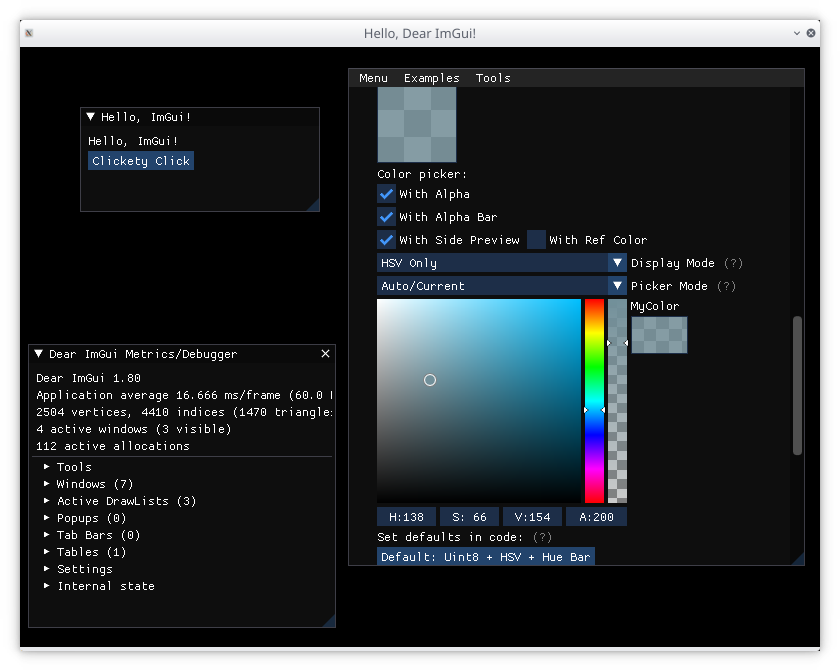
dear-imgui.hs can be used like a normal Haskell library. If you use Cabal,
add dear-imgui to your build-depends, together with the
dear-imgui-impl-<backend> package(s) for the platform and renderer backends
you want to use. For example, for a combination of SDL2 and OpenGL 3, plus the
sdl2, gl and managed packages the example below uses directly:
build-depends: dear-imgui, dear-imgui-impl-sdl2, dear-imgui-impl-opengl3, sdl2, gl, managed
With this done, the following module is the "Hello, World!" of ImGui:
{-# language OverloadedStrings #-}

module Main ( main ) where

import DearImGui
import qualified DearImGui.Impl.OpenGL3 as ImplGL3
import qualified DearImGui.Impl.SDL2 as ImplSDL2

import Graphics.GL
import SDL

import Control.Monad.Managed
import Control.Monad.IO.Class ()
import Control.Monad (when, unless)
import Control.Exception (bracket)

main :: IO ()
main = do
  -- Initialize SDL
  initializeAll

  runManaged $ do
    -- Create a window using SDL; as we're using OpenGL, we enable OpenGL too
    window <- do
      let title = "Hello, Dear ImGui!"
      let config = defaultWindow { windowGraphicsContext = OpenGLContext defaultOpenGL }
      managed $ bracket (createWindow title config) destroyWindow

    -- Create an OpenGL context
    glContext <- managed $ bracket (glCreateContext window) glDeleteContext
    -- Create an ImGui context
    _ <- managed $ bracket createContext destroyContext

    -- Initialize ImGui's SDL2 backend
    managed_ $ ImplSDL2.withInitForOpenGL window glContext
    -- Initialize ImGui's OpenGL backend
    managed_ $ ImplGL3.withInit Nothing

    liftIO $ mainLoop window

mainLoop :: Window -> IO ()
mainLoop window = unlessQuit $ do
  -- Tell ImGui we're starting a new frame
  ImplGL3.newFrame
  ImplSDL2.newFrame
  newFrame

  -- Build the GUI
  withWindowOpen "Hello, ImGui!" $ do
    -- Add a text widget
    text "Hello, ImGui!"

    -- Add a button widget, and call 'putStrLn' when it's clicked
    button "Clickety Click" >>= \clicked ->
      when clicked $ putStrLn "Ow!"

  -- Show the ImGui demo window
  showDemoWindow

  -- Render
  glClear GL_COLOR_BUFFER_BIT
  render
  ImplGL3.renderDrawData =<< getDrawData

  glSwapWindow window
  mainLoop window
  where
  -- Process the event loop
  unlessQuit action = do
    shouldQuit <- gotQuitEvent
    unless shouldQuit action

  gotQuitEvent = do
    ev <- ImplSDL2.pollEvent

    case ev of
      Nothing ->
        return False
      Just event ->
        (isQuit event ||) <$> gotQuitEvent

  isQuit event =
    eventPayload event == QuitEvent
Raw access
The high-level DearImGui module covers the common widgets. Everything else is
reachable through the generated dear-imgui-raw
packages that dear-imgui is built on: one module per struct
(DearImGui.Raw.ImGui, DearImGui.Raw.ImDrawList, ...), plain IO functions
taking the full imgui argument list, and OverloadedRecordDot field accessors on
struct pointers (poke io.iniFilename ptr). Enum values live in per-enum
modules and are meant to be imported qualified:
import qualified DearImGui.Raw.Enums.ImGuiWindowFlags as ImGuiWindowFlags

flags = ImGuiWindowFlags.NoTitleBar .|. ImGuiWindowFlags.NoResize
Renderer/platform backends live in the dear-imgui-impl-<backend> packages.
Each one exposes a raw layer (DearImGui.Raw.Impl.SDL2,
DearImGui.Raw.Impl.OpenGL3, ...) working on raw pointers, plus a bridge
module (DearImGui.Impl.SDL2, DearImGui.Impl.GLFW, ...) that accepts the
sdl2/GLFW-b handle types, feeds SDL events to ImGui (pollEvent) and
provides withInit* brackets. For Vulkan, DearImGui.Impl.Vulkan covers the
descriptor pool and ImGui_ImplVulkan_Init boilerplate, for both render-pass
and dynamic-rendering targets.
Hacking
If you would like to help dear-imgui, here's how you can get started.
The best path to development is using
Nix. Once you have Nix installed
(either in your operating system, or by running NixOS), add the haskell.nix
binary caches to your nix.conf so you don't end up building GHC from source:
extra-substituters = https://cache.zw3rk.com https://cache.iog.io
extra-trusted-public-keys = loony-tools:pr9m4BkM/5/eSTZlkQyRt57Jz7OMBxNSUiMC4FkcNfk= hydra.iohk.io:f/Ea+s+dFdN+3Y/G+FDgSq+a5NEWhJGzdjvKNGv0/EQ=
Then you can enter a development shell:
$ nix-shell
You should now be in a bash shell where you can run cabal build all,
cabal run readme, etc.
If you experience any difficulties, please don't hesitate to raise an issue.
Getting Help
Feel free to raise bugs, questions and feature requests on the GitHub issue tracker.
We have a Matrix room at
#dear-imgui.hs:ocharles.org.uk.