# Claferwiki
##### v0.5.8
**Claferwiki** is a wiki system integrated with [Clafer compiler](https://github.com/gsdlab/clafer). [Clafer](http://clafer.org) is a lightweight yet powerful structural modeling language. Claferwiki allows for embedding Clafer model fragments in wiki pages and provides model authoring support including code highlighting, parse and semantic error reporting, hyperlinking from identifier use to its definition, and graphical view rendering.
Claferwiki supports informal-to-formal modeling, that is, gradually refining parts of specification in natural language into a Clafer model fragments. Claferwiki supports *literate modeling* - both the rich text and the model fragments can be freely mixed. Informal-to-formal modeling is important during domain modeling.
Also, Claferwiki acts as a collaborative, lightweight, web-based model publishing environment for Clafer.
In addition to code highlighting, error reporting, hyperlinking, and graphical view rendering, it also provides model versioning and distributed online/offline editing capabilities as it is based on the Git distributed version control system and the [Gitit wiki](http://gitit.net/).
Claferwiki is also integrated with other Clafer Web Tools, allowing to open the current page in:
* Clafer Integrated Development Environment ([ClaferIDE](https://github.com/gsdlab/claferIDE)),
* Clafer Configurator ([ClaferConfigurator](https://github.com/gsdlab/ClaferConfigurator)),
* Multi-Objective [Visualizer and Explorer](https://github.com/gsdlab/ClaferMooVisualizer)
### Live demo
[Try me!](https://wiselab.uwaterloo.ca/modelwiki/) Also the [Railway Wiki](https://wiselab.uwaterloo.ca/railwaywiki/) and the [Traffic Lights Wiki](https://wiselab.uwaterloo.ca/trafficlightswiki/).
If the demo is down or you encounter a bug, please email [Michal Antkiewicz](mailto:michal.antkiewicz@uwaterloo.ca).
## Contributors
* [Michał Antkiewicz](https://uwaterloo.ca/wise-lab/profiles/michal-antkiewicz), Main developer. Requirements, development, architecture, testing, technology transfer.
* Chris Walker, co-op student May-Aug, 2012. Developer of Clafer Wiki, HTML and GraphViz generators.
* [Jimmy Liang](http://gsd.uwaterloo.ca/jliang), Clafer compiler support, including multi-fragment compilation, source/AST/IR traceability, parsing and compilation error reporting.
## Getting the Clafer Wiki
ClaferWiki is a [gitit](https://github.com/jgm/gitit) plugin: gitit loads it when it starts,
compiling it with GHC, so GHC and the claferwiki package must be available where gitit runs.
### Dependencies
* [Clafer compiler](https://github.com/gsdlab/clafer/) v0.5.8
* [GHC](https://www.haskell.org/downloads) v9.6.7 or v9.12.4
* [cabal-install](https://hackage.haskell.org/package/cabal-install) >= v3.10.3 (when building with `cabal`)
* [Git](http://git-scm.com)
* [Gitit wiki](http://hackage.haskell.org/package/gitit) v0.16.1 with plugin support (the `plugins` flag).
A dynamically linked gitit (for example, from a Linux distribution) can only load plugins since v0.16.1
([jgm/gitit#714](https://github.com/jgm/gitit/pull/714)).
* GraphViz
### Important: branches must correspond
All related projects are following the *simultaneous release model*.
The branch `master` contains releases, whereas the branch `develop` contains code under development.
When building the tools, the branches should match.
Releases from branches 'master` are guaranteed to work well together.
Development versions from branches `develop` should work well together but this might not always be the case.
### Installation
The plugin library is available on [Hackage](http://hackage.haskell.org/package/claferwiki-0.5.4/)
and can be built with either `stack` or `cabal-install`:
* `stack build` in a clone of this repository builds claferwiki and gitit;
start the wiki with `stack exec gitit -- -f gitit.cnf` (or `./claferwiki.sh`), so that gitit finds the packages.
* `cabal install --lib claferwiki` installs the library into the default GHC package environment,
where gitit finds it; start the wiki with `gitit -f gitit.cnf`.
The wiki needs `gitit.cnf`, `static/` and `templates/` from this repository in the directory where gitit runs.
# Usage
Wiki can be configured by editing the `gitit.cnf` file. See [Configuring and customizing gitit](http://gitit.net/README#configuring-and-customizing-gitit).
The wiki data is a git repository; see the `repository-path:` option in `gitit.cnf`.
## Features
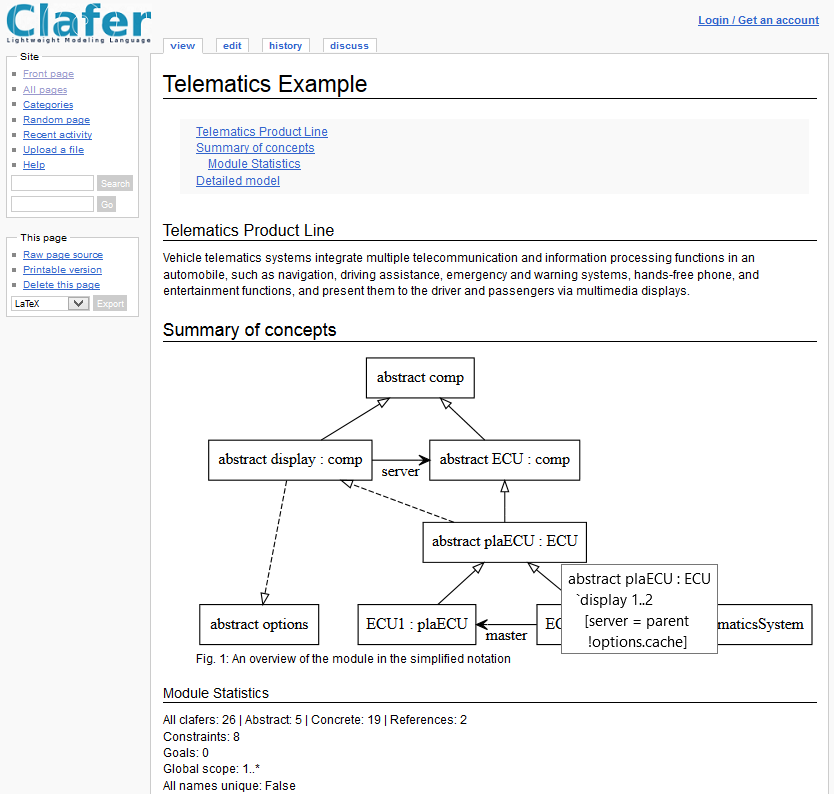
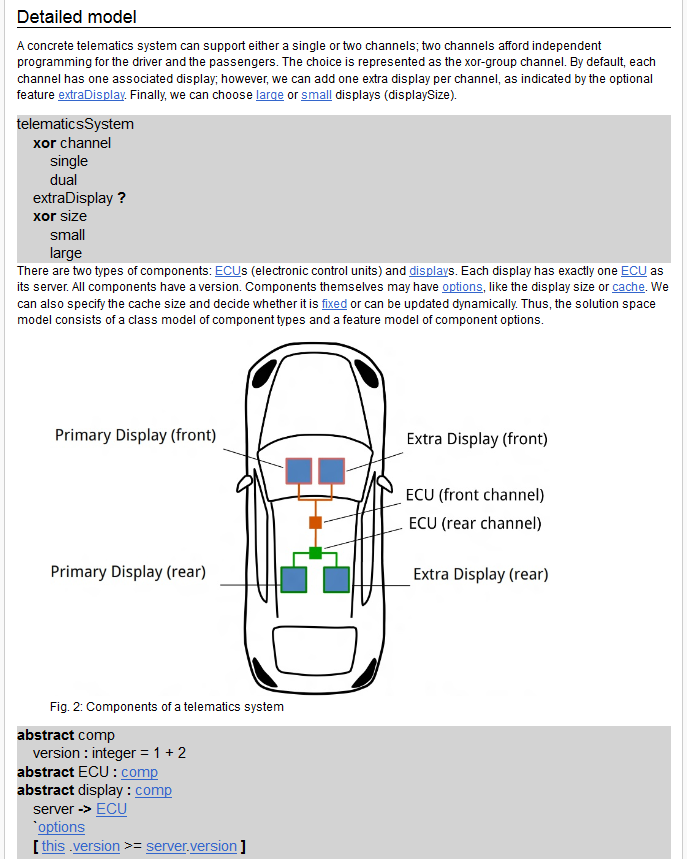 * syntax coloring for Clafer models
* linking from clafer name references within model fragments to clafer definitions
* linking from clafer names used in wiki text to clafer definitions
* pop-up information about clafers in graph rendering
* translating constraints to controlled natural language and showing as pop-up?
* overview with graph rendering, statistics, and download links for the entire model source and self-contained HTML rendering
* integration with ClaferMooVisualizer
## Using Clafer Wiki
For general usage information for the GitIt wiki see the [README](http://gitit.net/README).
You can insert code blocks with clafer code anywhere in the page as follows:
\`\`\`clafer
``
\`\`\`
The model overview, including the graph, stats, and download links, can be added as follows:
\`\`\` `{.clafer .summary}`
``
\`\`\`
To have the code blocks correctly processed, make sure to add an empty line before and after the code block, even if the code block is the last element on the page.
The blocks `{.clafer .ide}`, `{.clafer .config}`, and `{.clafer .mooviz}` become buttons that open the page's model in ClaferIDE, ClaferConfigurator, and ClaferMooVisualizer.
By default, the buttons link to the tools' ports 8094, 8093, and 8092 on the host that the browser used to reach the wiki.
The environment variables `CLAFERIDE_URL`, `CLAFERCONFIGURATOR_URL`, and `CLAFERMOOVISUALIZER_URL` give the tools' URLs instead, either full URLs or paths on the wiki's host, e.g., `CLAFERIDE_URL=/claferide/`.
Behind a reverse proxy, the wiki takes its own URL, which the tools load the model from, from the headers `X-Forwarded-Host`, `X-Forwarded-Proto`, and `X-Forwarded-Prefix`, e.g., with Apache:
```
ProxyPass /modelwiki/ http://127.0.0.1:8091/
RequestHeader set X-Forwarded-Proto "https"
RequestHeader set X-Forwarded-Prefix "/modelwiki"
```
## How it works
* Clafer Wiki is a set of plugins for the GitIt wiki which processes clafer code blocks and invokes the Clafer compiler.
* All code blocks on a single page are interpreted as a single module.
* The Clafer compiler generates HTML rendering of each code block.
* The rendering is enriched with:
* links to the definitions for super clafers (inheritance)
* links to the types of references
* compiler error highlights
# Need help?
* Visit [language's website](http://clafer.org).
* Report issues to [issue tracker](https://github.com/gsdlab/claferwiki/issues)